

1. sleepingshark
- Date: Oct 2, 2026
- Difficulty: Dreamhack - Gold
We are presented with a packet capture. At first glance, there are a lot of HTTP requests with the same structure.
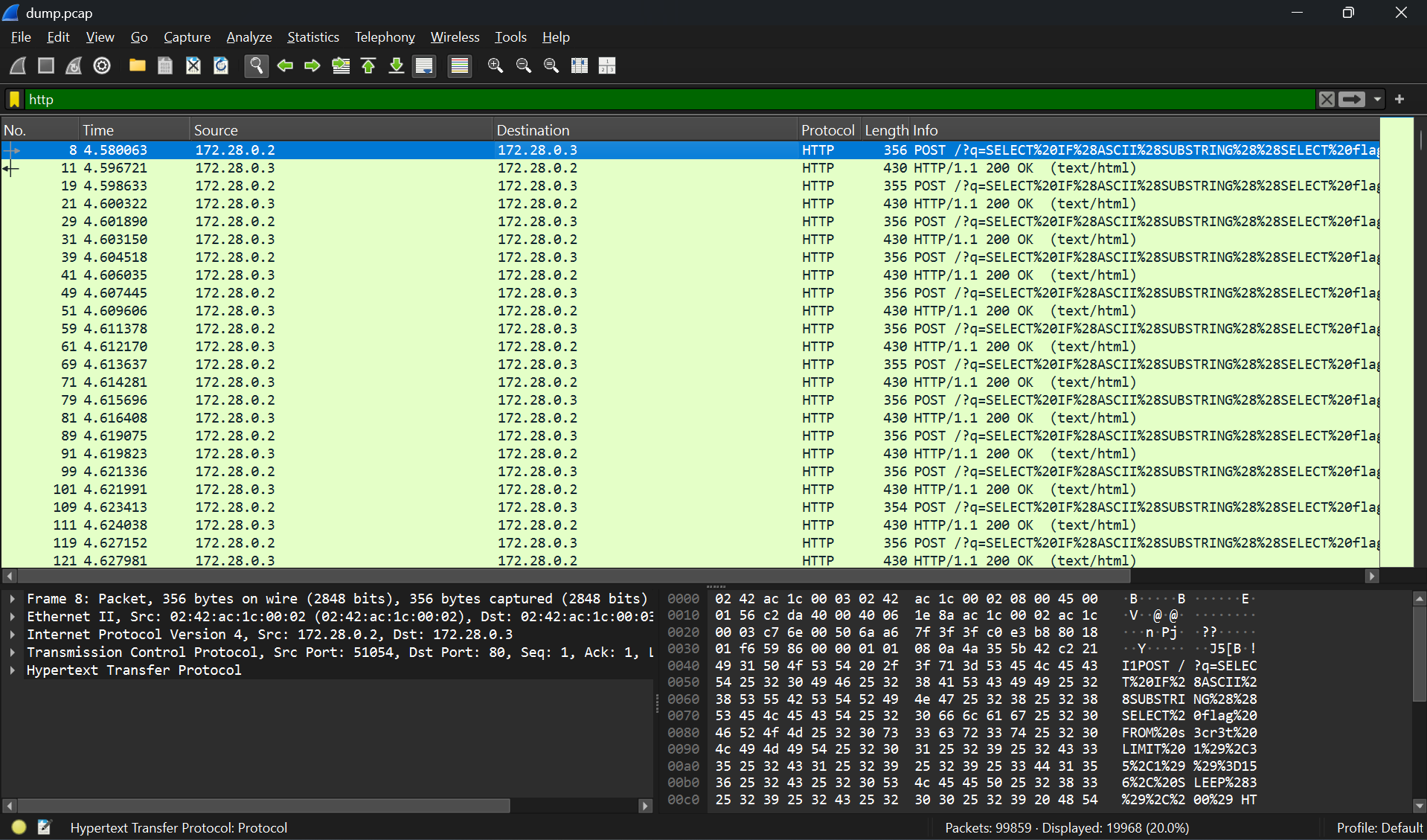
For example:
SELECT%20IF%28ASCII%28SUBSTRING%28%28SELECT%20flag%20FROM%20s3cr3t%20LIMIT%201%29%2C35%2C1%29%29%3D156%2C%20SLEEP%283%29%2C%200%29
With an URL decoder, this is translated into
SELECT IF(ASCII(SUBSTRING((SELECT flag FROM s3cr3t LIMIT 1),35,1))=156, SLEEP(3), 0)
This is a typical example of an SQL injection payload used for blind time-based data exfiltration. You can read more about it in this Portswigger’s article.
To visualize, let’s take a closer look at the timestamps:
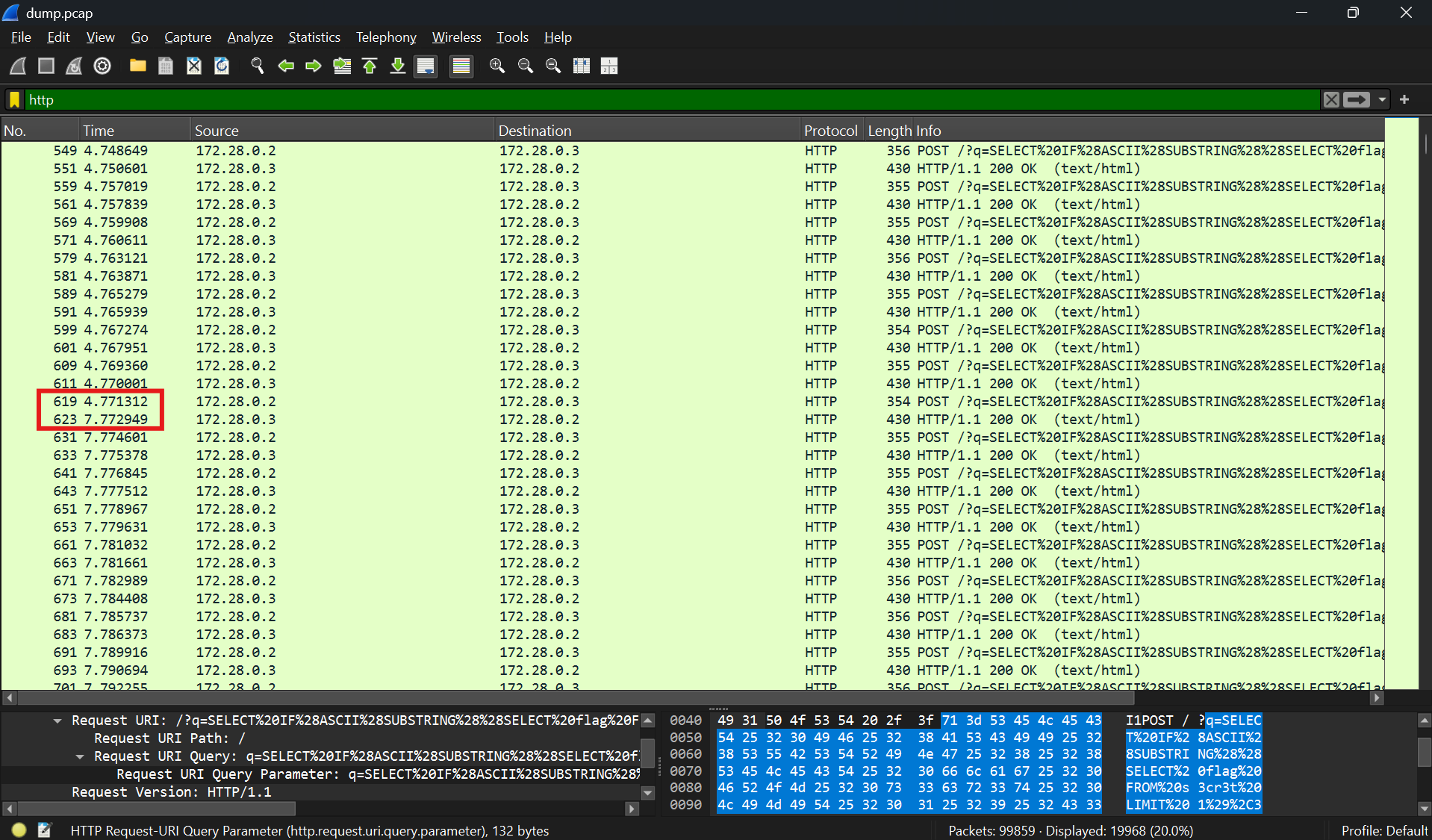
All of the requests go by the structure:
SELECT IF(ASCII(SUBSTRING((SELECT flag FROM s3cr3t LIMIT 1),x,1))=y, SLEEP(3), 0)
This query test if the letter in position x equals the value y. If correct, it will sleep for 3 seconds; else, do nothing. Therefore, all of the payloads are incorrect, except for the one before the time leap. We can filter the correct payload manually by following the stream and extract each characters one by one for the flag.
For example,
SELECT IF(ASCII(SUBSTRING((SELECT flag FROM s3cr3t LIMIT 1),1,1))=71, SLEEP(3), 0)
cause the time leap, therefore flag’s letter #1 has the ASCII value of 71 (G).
Or we can automate the process with tshark commands:
tshark -2 -r dump.pcap -Y 'http.request or http.response' \
  -T fields -e tcp.stream -e http.request.uri -e http.time |
awk -F '\t' '$2 ~ /SUBSTRING/ {q[$1]=$2} $3+0 > 2.75 {
  split(q[$1], x, /%2C|%3D/)
  print x[2], x[4], sprintf("%c", x[4])
}' | sort -n
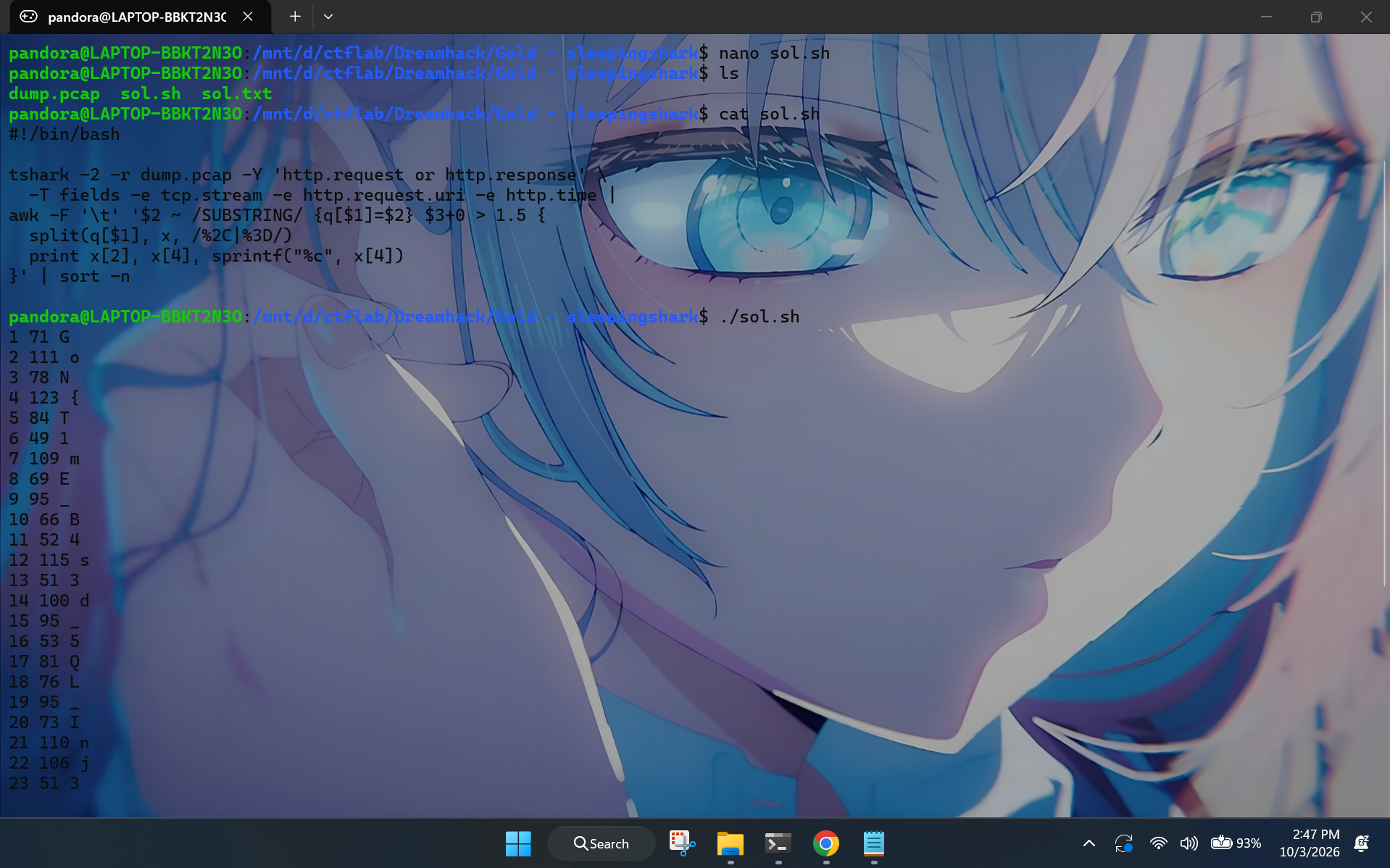
GoN{T1mE_B4s3d_5QL_Inj3c7i0n_wI7h_Pc4p}
2. Dream Zoo
- Date: Oct 5, 2026
- Difficulty: Dreamhack - Gold
We are presented with a packet capture. At first glance, there is DNS exfiltration of a ZIP file, as we can see 50 4b...
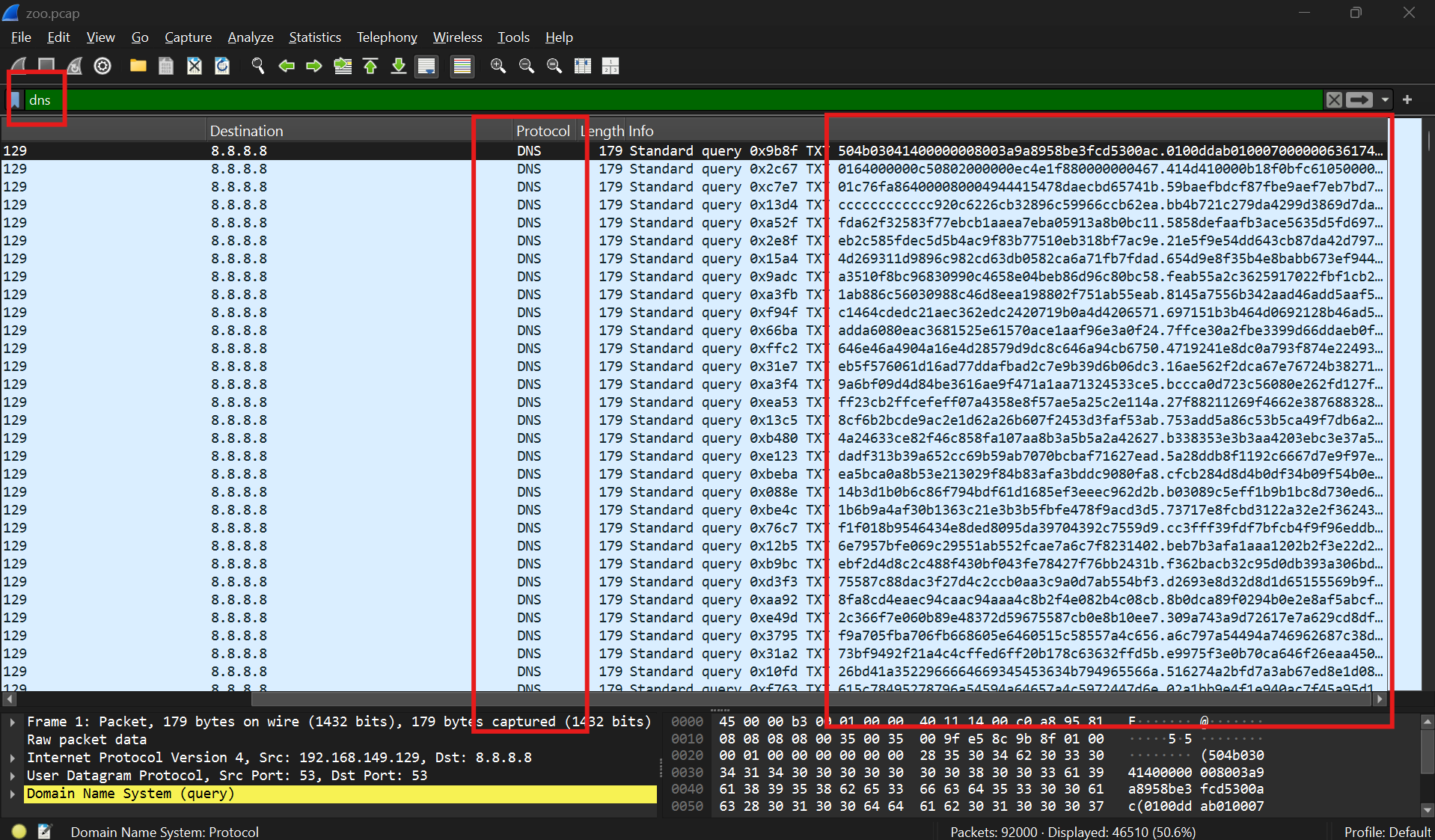
Retrieve the ZIP with this shell script:
#!/usr/bin/env bash
set -euo pipefail

if [[ $# -lt 2 || $# -gt 3 ]]; then
  echo "Usage: $0 capture.pcapng output.bin [exfil-domain]" >&2
  exit 2
fi

pcap=$1
output=$2
zone=${3:-}

tshark -n -r "$pcap" \
  -Y 'dns.flags.response == 0 && dns.qry.type == 16' \
  -T fields -E occurrence=f -e dns.qry.name |
awk -v zone="$zone" '
function ishex(s) { return s ~ /^[0-9a-f]+$/ }
{
  name = tolower($0)
  sub(/\.$/, "", name)
  n = split(name, part, ".")

  limit = n
  if (zone != "") {
    z = split(tolower(zone), suffix, ".")
    if (n <= z) next
    matchzone = 1
    for (i = 1; i <= z; i++)
      if (part[n-z+i] != suffix[i]) matchzone = 0
    if (!matchzone) next
    limit = n - z
  }

  for (i = 1; i <= limit && ishex(part[i]); i++)
    printf "%s", part[i]
}
END { print "" }
' | xxd -r -p > "$output"

echo "Wrote $output"
file "$output"
xxd -l 8 "$output"
Extract the ZIP file, we get images of a bunch of animals, as well as the hint: “Animals that receive hearts are hiding something.”
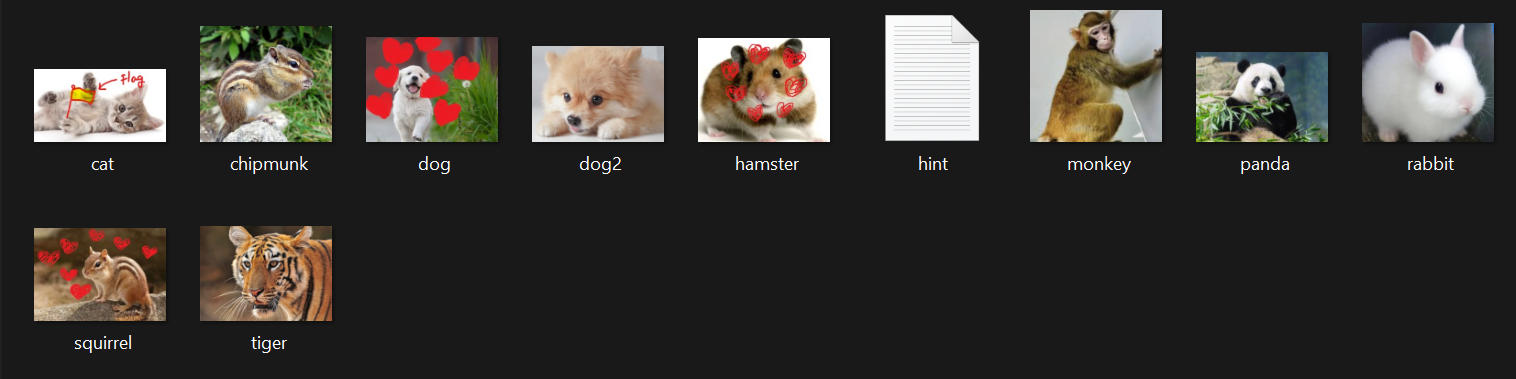
In the images, the animals that received the hearts are dog, squirrel, and hamster. And the cat image has a drawing of a “flag”. The next step should be steganography, I suppose.
And then, in an autopilot manner, I tried a plethora of steganography decoding techniques, ranging from spamming WSL commands to Online Stegnography Decoder, but sadly, none of them carve out any hidden messages…
Except for one: OpenStego. An ancient technique that receded into the mist of time. Too bad I forget about this :(˜
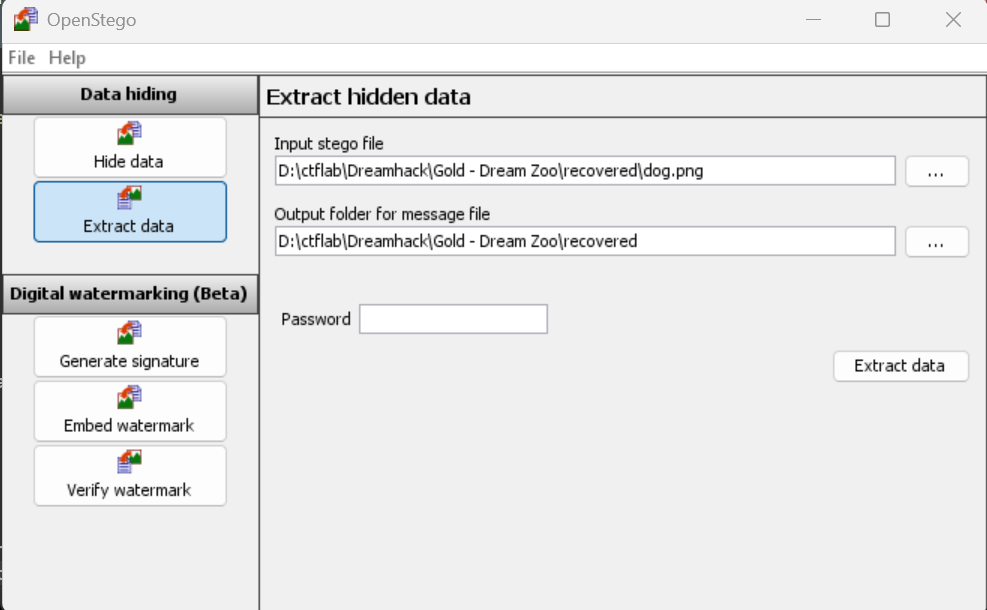
Extract without password those three images, we get another 3 sussy file: giraffe.png, hint2.png, and parrot.png
- The giraffe image actually contains 2 giraffes, with a message: “How many animals exist in the zip file in total?”
- The parrot image also contains 2 parrots and a message: “XOR”
- and hint2.txt: ( cat’s hidden ) ( squirrel’s hidden ) ( dog’s hidden ) = FLAG
We’ve already known that squirrel’s hidden is XOR, and dog’s hidden is the total amount of animals. Count them all and we have 10 original + 2 giraffes + 2 parrots = 14. So now the flag is (cat's hidden) XOR 0x14
Initially, I don’t know what (cat’s hidden) could possibly mean. After a while, it’s dawned on me that I am supposed to utilize OpenStego, again. Extract cat.png using OpenStego, and we retrieve flag.txt (so aptly named) as followed:
JFu:l`>|c:bQj`}Q~:me=zQb=:e}Qj:z:s
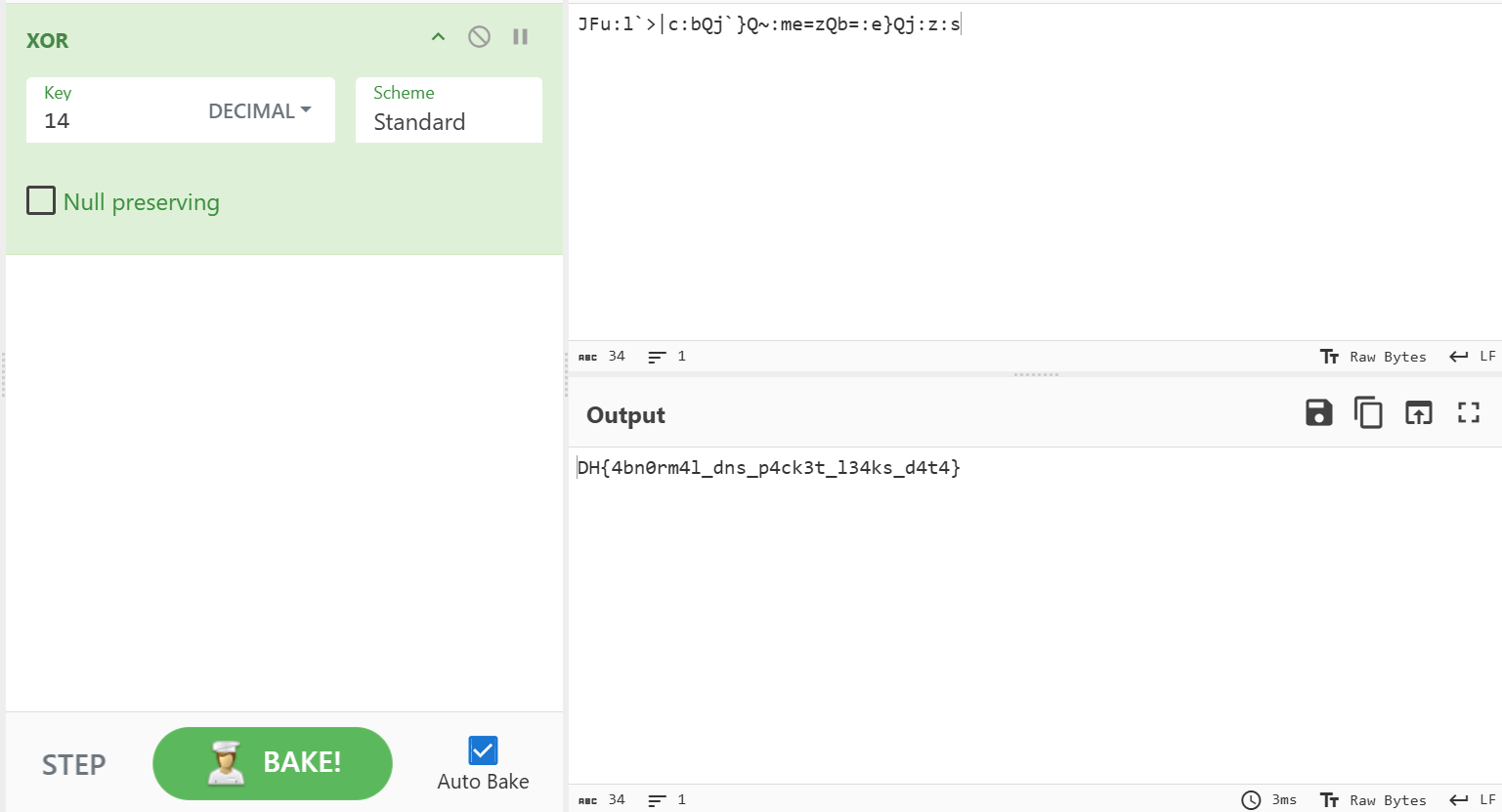
DH{4bn0rm4l_dns_p4ck3t_l34ks_d4t4}
3. Don’t miss the data
- Date: Oct 6, 2026
- Difficulty: Dreamhack - Platinum
We are presented with a .docx file. Its content is of little significance, so as usual, I inspected the metadata. After spamming xxd and binwalk, I’ve extracted a ZIP file containing a lot of .xml. At first, I thought I was discovering something abnormally important. Little did I know, I was just reinventing the wheel. xxd and binwalk is kinda extra in this context, truly a “spam vs. skill” moment :(
The
.docxitself, intrinsically, is a.ziparchive containing XML files, images, and other structural components. According to this article, you can access or inspect the hidden contents of any modern Microsoft Word file by changing its file extension.
The takeaway is that, whenever you see a .docx, you should be thinking about its .zip. Once opened or extracted, you will see a structured folder system:
word/: Contains the core content, including a media folder where all embedded images, videos, or audio files are stored raw.docProps/: Contains document properties like author name, creation date, and editing time._rels/: Contains relationship mappings for how different parts of the document connect.[Content_Types].xml: Defines the types of XML content used in the archive package
Wandering around, I noticed that the files in here are relating to the original .docx file itself, nothing special. However, in word/media/, there is a weird file called header_bg.png, a blank image, which is nowhere to be seen in the original document…
Upon inspecting its metadata, there seems to be a ZIP archive hidden within.
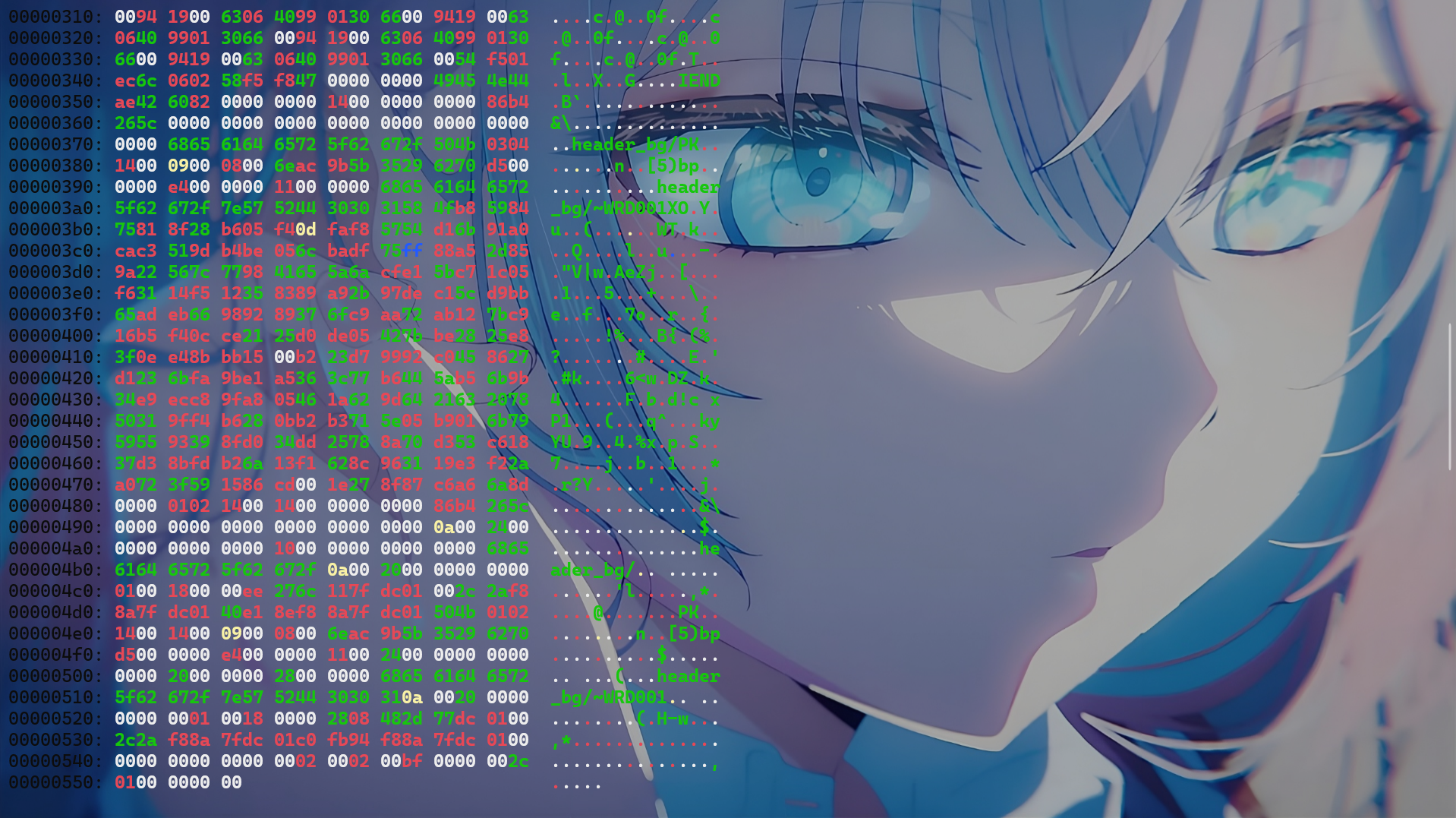
However, there is a corruption when I try to extract the hidden ZIP.

Solve script
#!/usr/bin/env bash
set -euo pipefail

file="hidden_repaired.zip"

dd if=header_bg.png of="$file" bs=1 skip=852 count=513 status=none

printf '\x50\x4b\x03\x04' | dd of="$file" bs=1 seek=0   conv=notrunc status=none
printf '\x0a\x00'         | dd of="$file" bs=1 seek=26  conv=notrunc status=none
printf '\x50\x4b\x01\x02' | dd of="$file" bs=1 seek=300 conv=notrunc status=none
printf '\x50\x4b\x05\x06' | dd of="$file" bs=1 seek=491 conv=notrunc status=none
After successfully decompress the ZIP file, we are presented with yet another problem: the secret memo file requires a password.
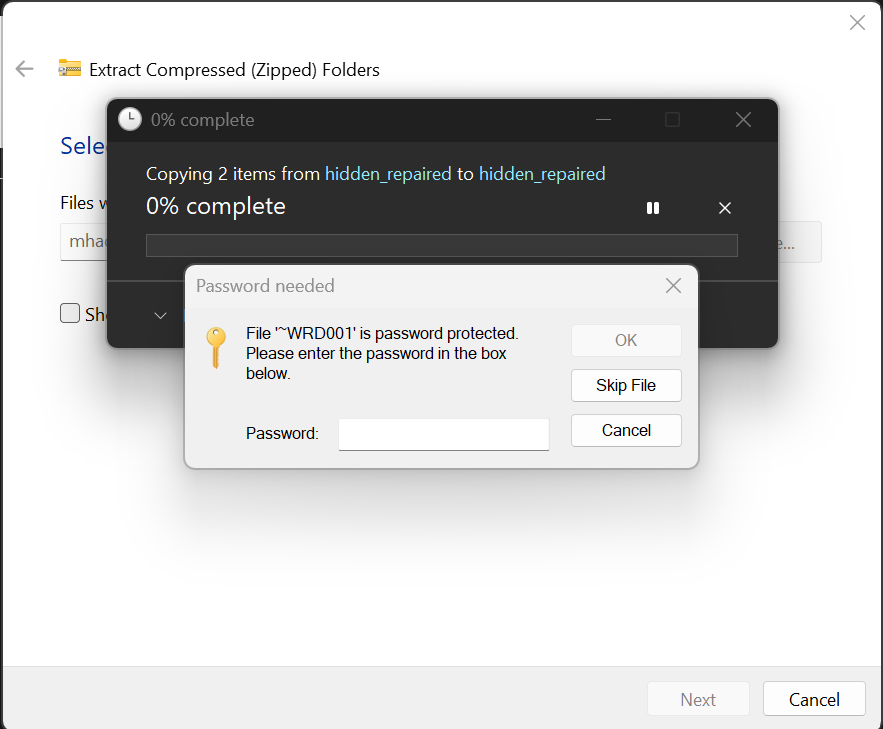
Any file starts with ~WRD (typically with a .tmp extension) is a hidden temporary work file automatically created by Microsoft Word while a document is actively open.
Wandering in the folder system, I stumbled upon a seemingly base64 “keyWrap” with a very sussy name “Top Secret”.
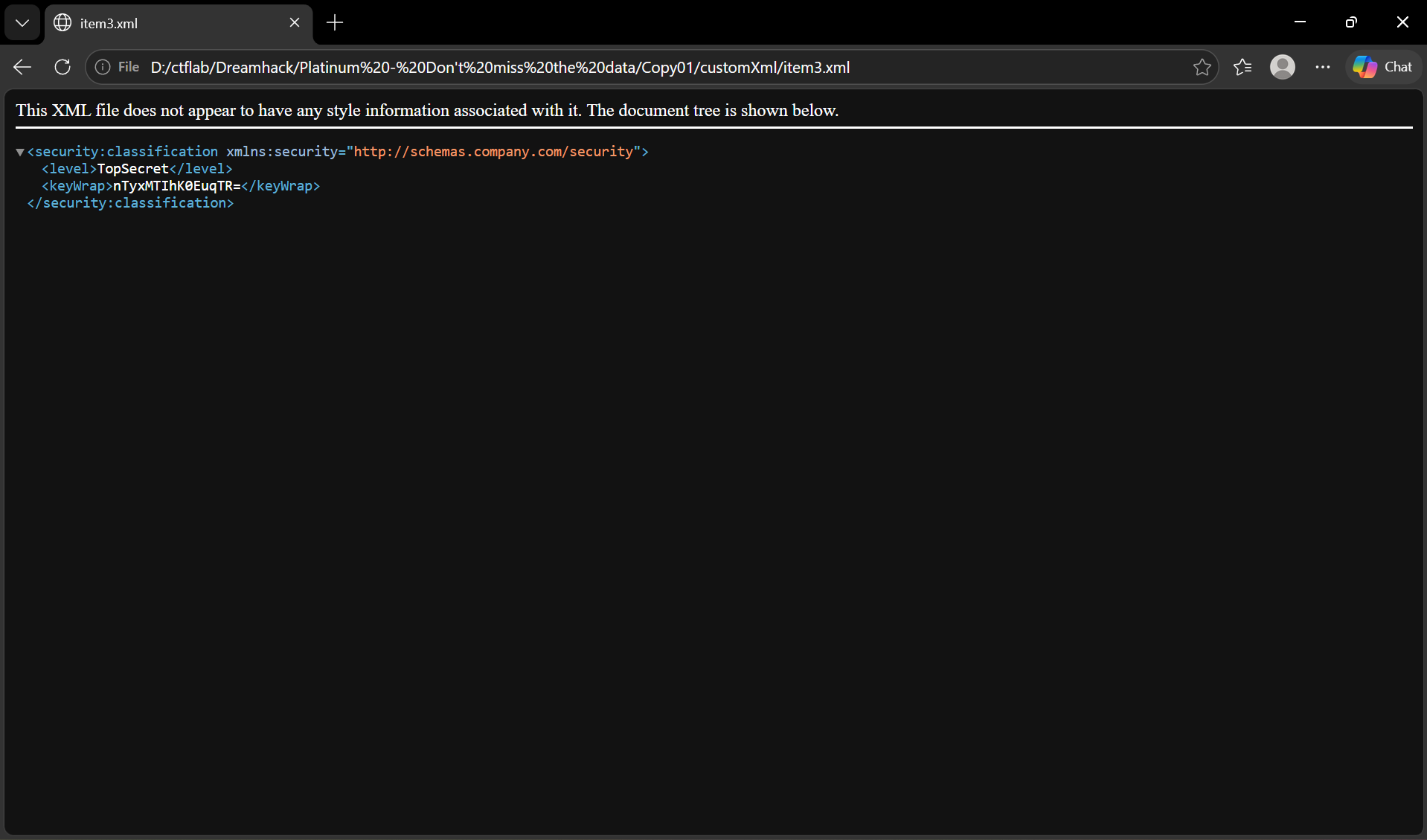
This encoding nTyxMTIhK0EuqTR= seems like a base64, but CyberChef can not decode that, not even the Magic mode. It ends up to be a ROT13 --> Base64 with some brute-forcing.
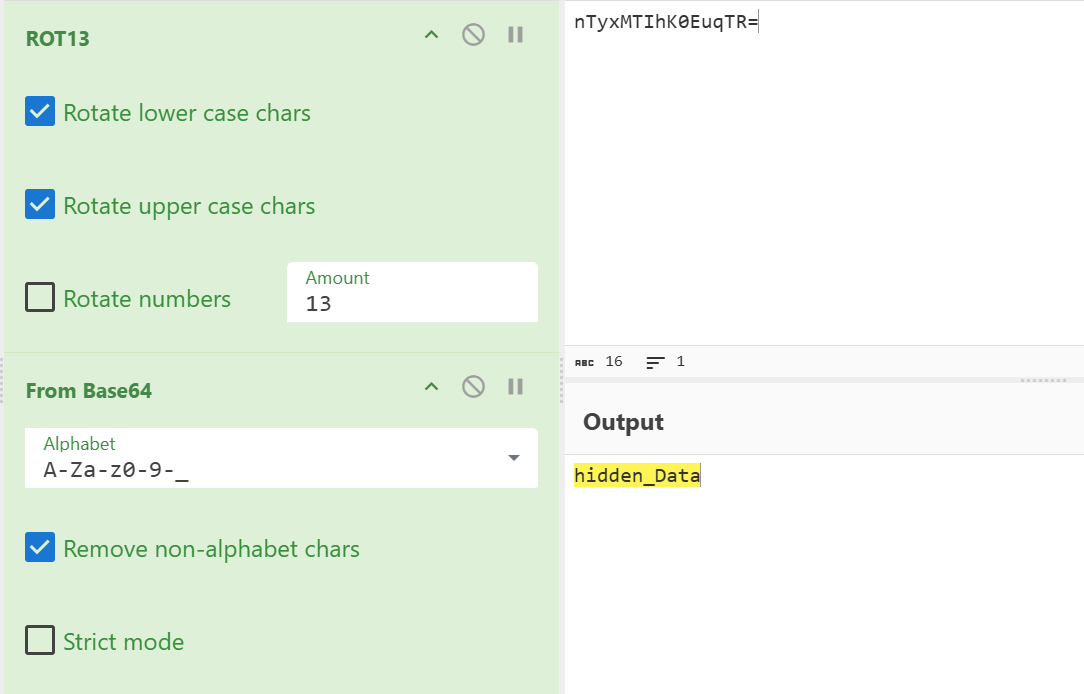
We retrieve the passphrase hidden_Data to open the temporary memo file.
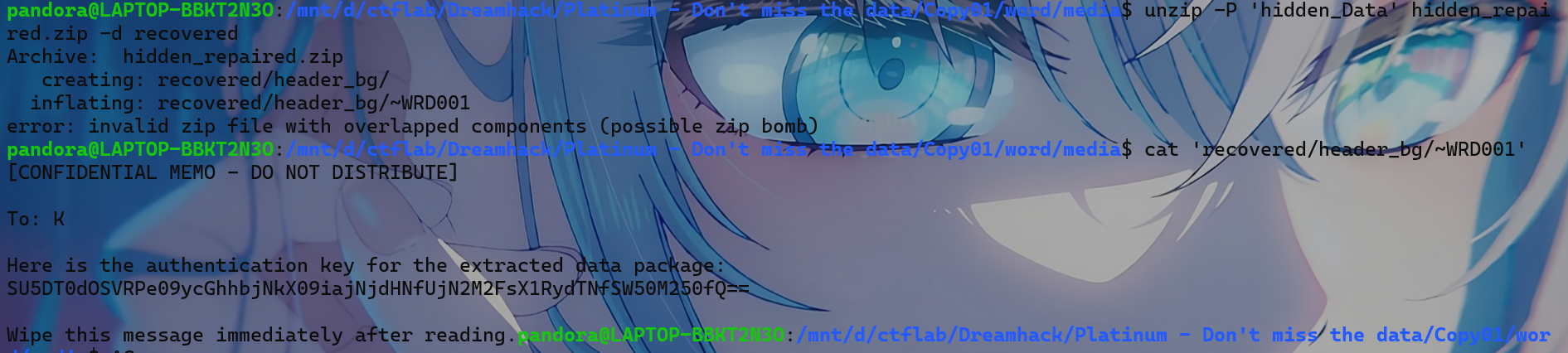
This time around, this base64 is simply the flag we are looking for.
INCOGNITO{Orphan3d_Obj3cts_R3v3al_Tru3_Int3nt}